
MediaDash

The one plugin a Jellyfin library owner needs. Duplicates, broken files, oversized encodes, wrong-language tracks, misplaced files, missing subtitles, corrupt artwork, executables where media should be, stale content — surfaced on one dashboard and fixed the moment your server goes idle.

CI status Latest release Jellyfin 10.11 or 12.0 GPLv3 license
MediaDash overview dashboard showing system stats, drive usage and open issues by type

Install

Requires Jellyfin 10.11+ or 12.0+. One binary covers both host lines.

1
Add the repository
In Jellyfin: Dashboard → Plugins → Repositories → + and paste this URL:
https://raw.githubusercontent.com/crackruckles/MediaDash/main/manifest.json
2
Install from the Catalog
Open the Catalog, find MediaDash, click Install, then restart Jellyfin.
3
Open MediaDash
Dashboard → My Plugins → MediaDash — the first-run wizard walks you through each feature, one step at a time.

What it finds & fixes

Every fix type runs independently: Off · Detect only · Ask me first · Automatic.

content_copyDuplicate copies

Same movie, episode, song, audiobook or book twice — matched by TMDb/IMDb/TVDb, MusicBrainz, ISBN, or name + year.

Fix: deletes the worse copy — you choose what "worse" means.

blockFiles that won't play

Broken video (test-played at start, middle and end) plus book / comic integrity probes for EPUB / PDF / MOBI / AZW3 / CBZ / CBR / CB7.

Fix: removes them, after re-checking they're really broken.

compressOversized encodes

Anything above your resolution or bitrate ceiling. Detect-only audio ceiling flags high-bitrate MP3 / AAC.

Fix: re-encodes to your chosen codec + container (GPU-accelerated).

subtitlesUnwanted subtitles

Embedded tracks and external files in languages you don't keep.

Fix: lossless remux — no quality loss.

volume_upUnwanted audio

Extra audio tracks outside your language list.

Fix: lossless remux — never touches a file's only audio track.

closed_captionMissing subtitles

Videos with no subtitle in any language you keep.

Fix: downloads via Jellyfin's configured providers (OpenSubtitles, etc.).

drive_file_moveMisplaced files

A movie under TV, an audiobook under Books, a comic under Music — per-type routing across Movies / TV / Anime / Music / Audiobooks / Books / Comics / Pictures.

Fix: moves it into the right library folder.

image_not_supportedCorrupt artwork

Zero-byte, truncated or unreadable poster / backdrop files inside Jellyfin's metadata cache.

Fix: deletes the broken image so Jellyfin re-fetches it. Never touches artwork you placed alongside your media.

gpp_badMalware & executables

.exe, .msi, .bat, .ps1, .sh, .lnk and other non-media files that don't belong in a media library — almost always malware bundled with pirated releases.

Fix: moves them to the recycle bin.

scheduleStale content

Media nobody has played in your configured window (default 365 days) — across video, audio, audiobook and book libraries.

Detect-only — surfaces the list so you decide.

A tour, tab by tab

Four tabs, one dashboard. Here's what each one is for.

01

Overview — the at-a-glance page

Live CPU / RAM / GPU stats, per-drive free space (with library drives flagged), and a savings breakdown by issue type. Click any bar to jump straight to those issues.
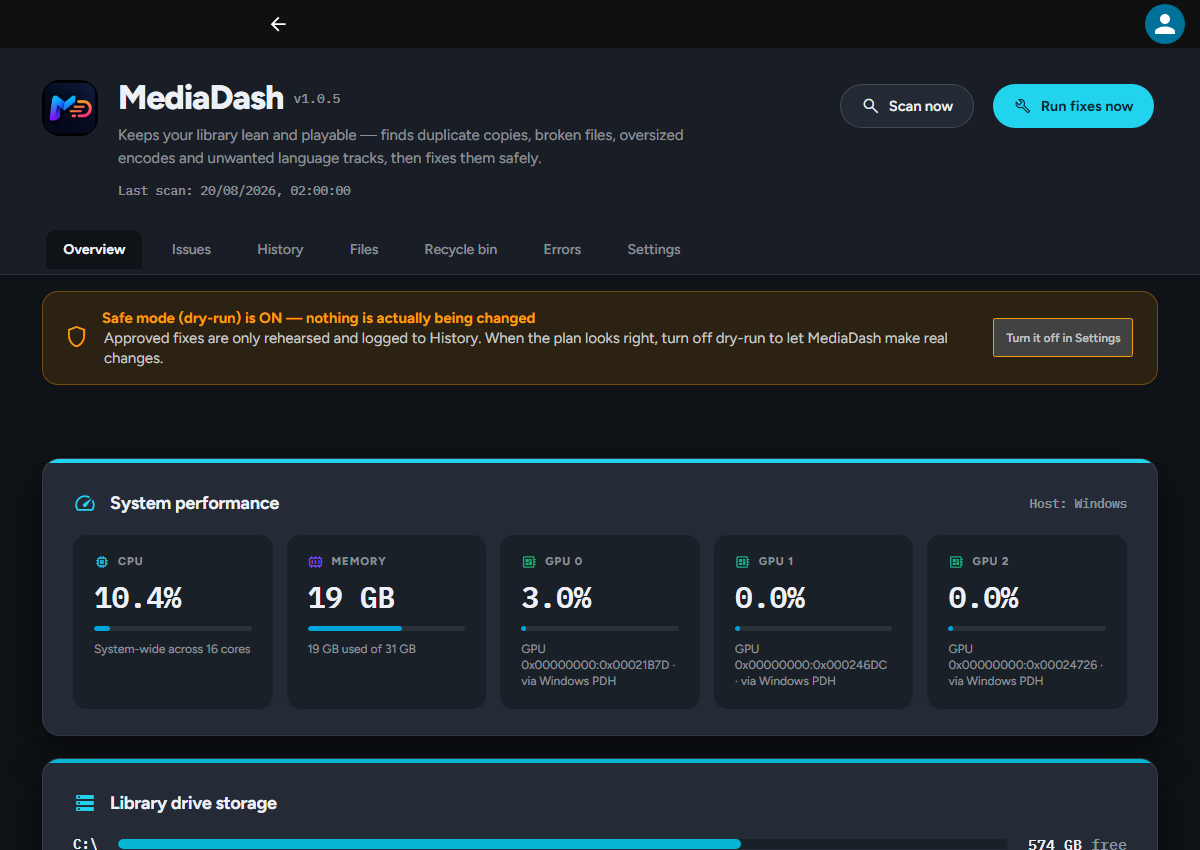
Overview tab: system stats, drive usage and savings-by-type bars
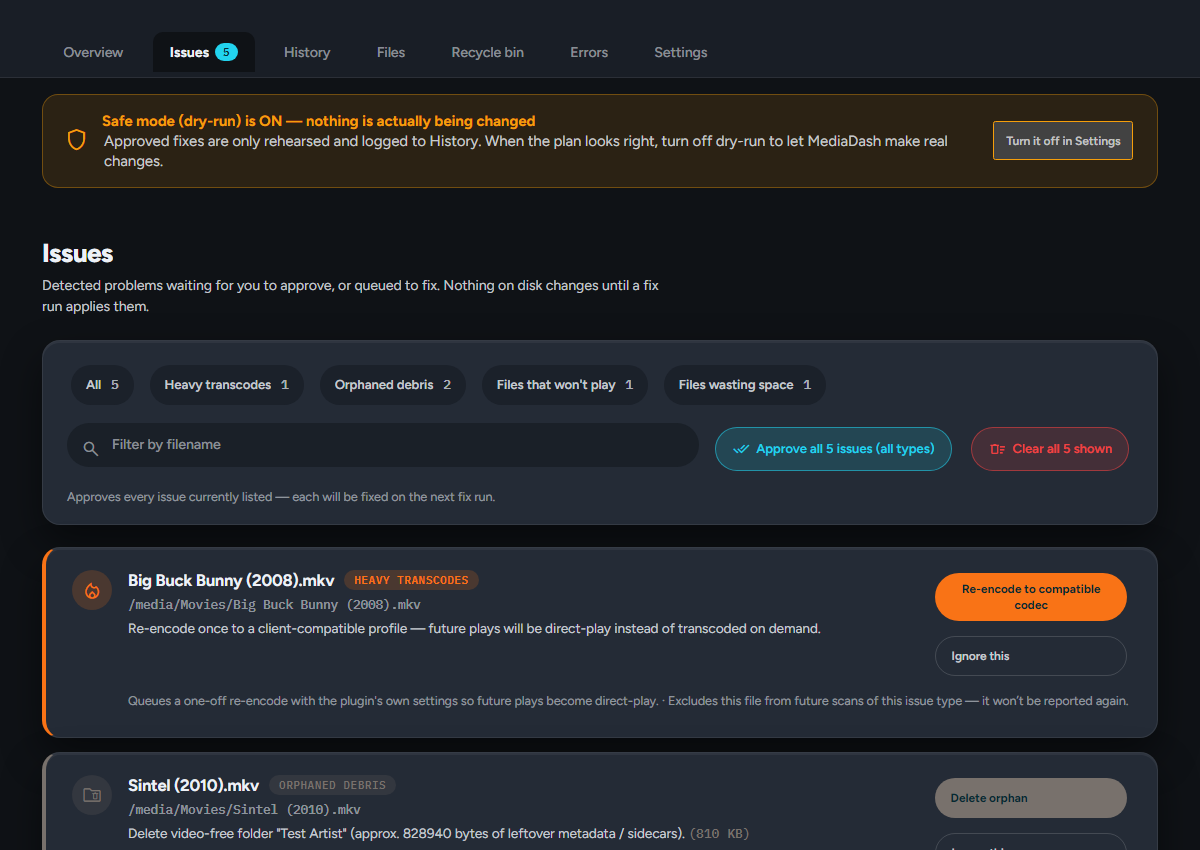
Issues tab: detected problems with one-click actions
02

Issues — approve or dismiss

Everything the scanner found, grouped by type, with a clear one-line action for each. Approve to queue a fix, dismiss to hide, or bulk-select for larger batches. Dry-run mode is on by default so you can preview every fix before it touches a file.

03

History — what was done, and undo

Every fix MediaDash has run, filterable by outcome (succeeded, failed, dry run). Bytes saved per library so you can see where the wins came from. Removed files land in a 30-day recycle bin with one-click Restore.
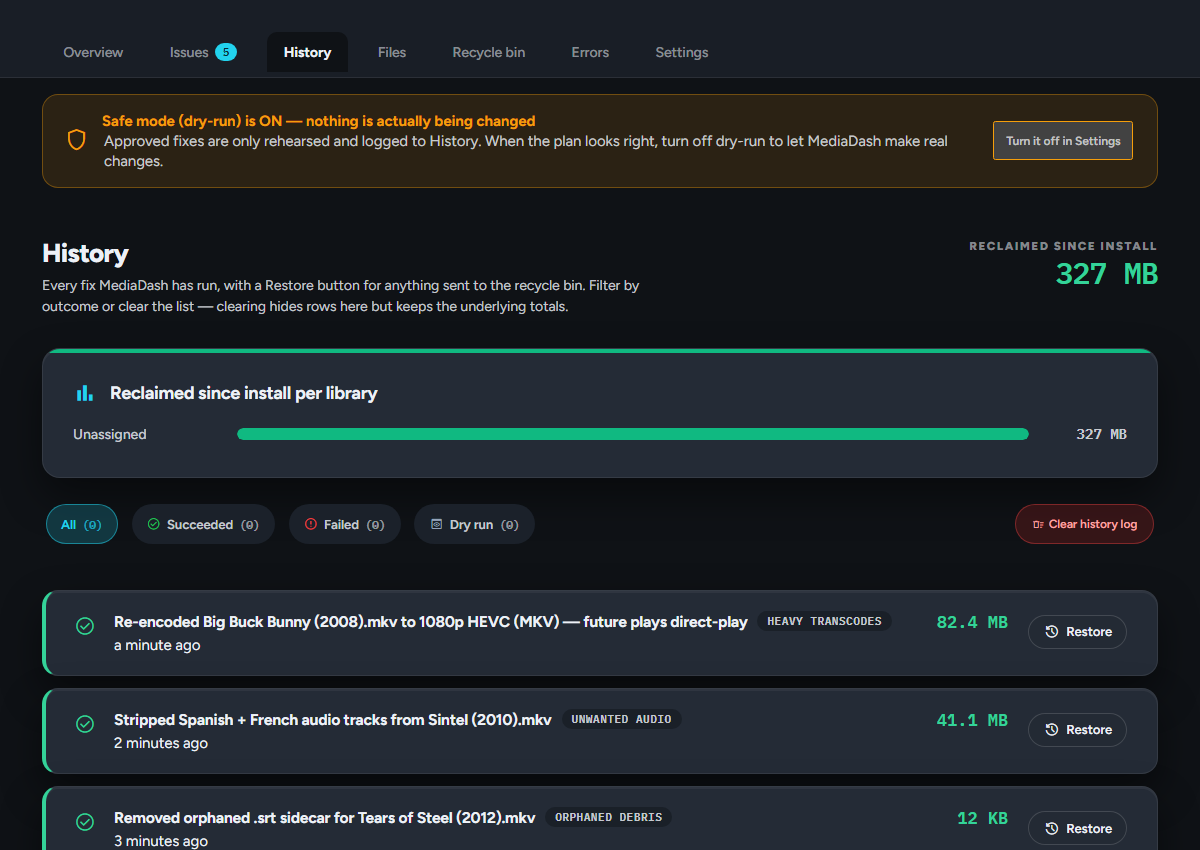
History tab: per-library savings and per-fix Restore buttons
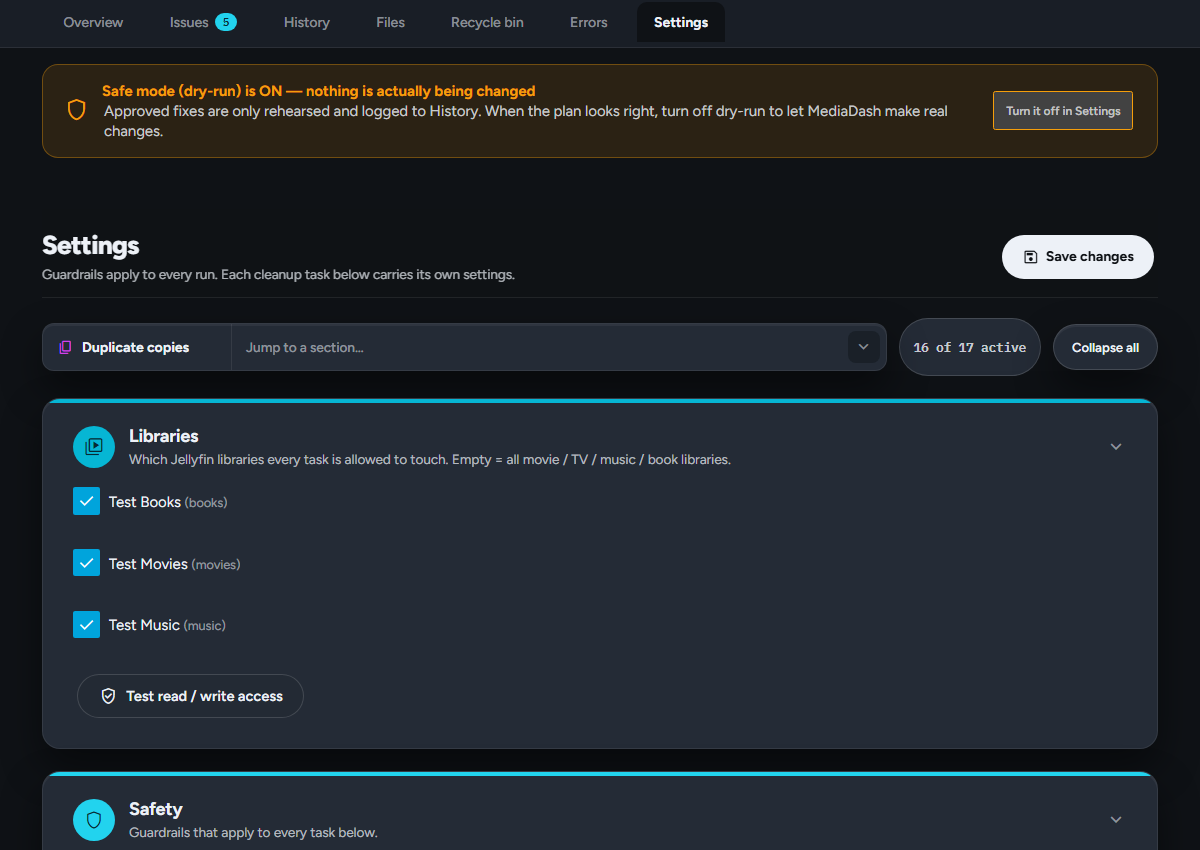
Settings tab: per-issue-type fix modes
04

Settings — one knob per fix type

Each fix type gets its own row with the same four choices: Off, Detect only, Ask me first, or Automatic. Removed files can go to the recycle bin (default) or be deleted permanently. Language lists, resolution ceiling, target codec and hardware encoder settings all live here.

Built to be trusted with your media

shieldDry-run by default

Fix runs only log what they would do until you say otherwise.

restore_from_trashRecycle bin, not deletion

Removed files are recoverable for 30 days with one-click Restore.

verifiedVerify + safe swap

Re-encodes stage the new copy to a sidecar before disposing the original, so a failed rename never leaves you with both files gone.

lockHard limits

Never touches files outside your libraries, never removes a file's only audio track, always checks free disk before encoding.

bedtimeFires only when idle

The fix task wakes every 15 minutes and skips whenever anyone is watching or was active in the last 15 minutes.

error_outlineEvery failure surfaces

Errors tab captures anything a scanner or fixer would otherwise swallow — permission denied, transient I/O, missing ffmpeg.

Community impact

Aggregated across opt-in installs — updated live from the community board.

Live
savings
Storage reclaimed
this month
handyman
Files fixed
this month
home_work
Reporting installs
active this month
calendar_month
This month
reclaimed since the 1st

bar_chartWhere the wins came from

content_copy Duplicate copies removed 0
play_disabled Broken files removed 0
compress Oversized files re-encoded 0
subtitles Unwanted subtitles stripped 0
volume_up Unwanted audio stripped 0
drive_file_move Misplaced files moved 0
closed_caption Missing subtitles downloaded 0
hourglass_bottom Stale files retired 0
image_not_supported Corrupt artwork repaired 0
gpp_bad Suspicious files quarantined 0
folder_special Ungrouped media grouped 0
image Trickplay thumbnails re-encoded 0
text_fields Subtitle fonts stripped 0
folder_delete Orphaned debris removed 0
description Corrupt NFO deleted 0
local_fire_department Heavy transcodes pre-encoded 0
error_outline Failed transcodes recovered 0
album Embedded cover art consolidated 0

On by default; untick in Settings → Safety to opt out. No paths, no filenames, no usernames — see what's collected.

FAQ

Will it delete something I can't get back?
Not unless you choose both permanent delete and turn off dry-run. Out of the box, everything removed sits in the recycle bin for 30 days.
Why isn't a broken file fixed automatically?
Broken files can't be repaired — MediaDash flags them so you decide. Even in full-automatic mode, removing broken files always waits for your approval.
A track has no language tag — will it be removed?
Never. Untagged tracks are always kept, because deleting a track whose language is unknown isn't safe.
How does MediaDash download subtitles?
It uses Jellyfin's own subtitle providers — the ones you'd configure at Dashboard → Metadata → Subtitles. If you haven't set any up, missing-subs fixes fail with a specific message telling you why. No new keys, no new provider — the same OpenSubtitles (etc.) account you already have.
Does re-encoding lose my subtitles?
Not with the default MKV output. MP4 output skips subtitle tracks (the format's support is too patchy) — the setting says so.
Does the plugin download or acquire media?
No. MediaDash is explicitly not an arr-style acquisition tool. It cleans, verifies and completes the library you already have.
Where do I report a bug?
In the plugin: Errors tab → Copy diagnostics, then paste into a new GitHub issue. The dump includes plugin/Jellyfin/OS/runtime versions and every recorded error.
What data does it collect?
Anonymous community stats (on by default): per-month fix counts across every scanner, total bytes freed, plugin/Jellyfin version and a month-rotated install ID (SHA-256 of Jellyfin's own SystemId + this year-month; rotates on the 1st of every month so nothing links reports across months, and no persistent UUID is stored on disk). No paths, no filenames, no usernames. Untick in Settings → Safety to opt out. Full list in docs/PRIVACY.md.